A stupid amount of work for a date
I tried to turn the lantern scene from Tangled into an actual place you could walk around in. Here is what it took, and the part nobody warns you about.
I was trying to recreate a scene from one of our favorite movies (Tangled), the lantern scene, boat on a dark lake, sky full of floating lanterns, because apparently the correct response to liking a movie is to burn a weekend and $90 of someone else's GPUs rebuilding it as explorable geometry instead of, you know, watching it again. Not a video of it, an actual place you can move around in with the two of us in the boat. Anyway. Here's what it took and the two things I'd tell the next person dumb enough to try this.
The obvious way to do this, and why it doesn't work
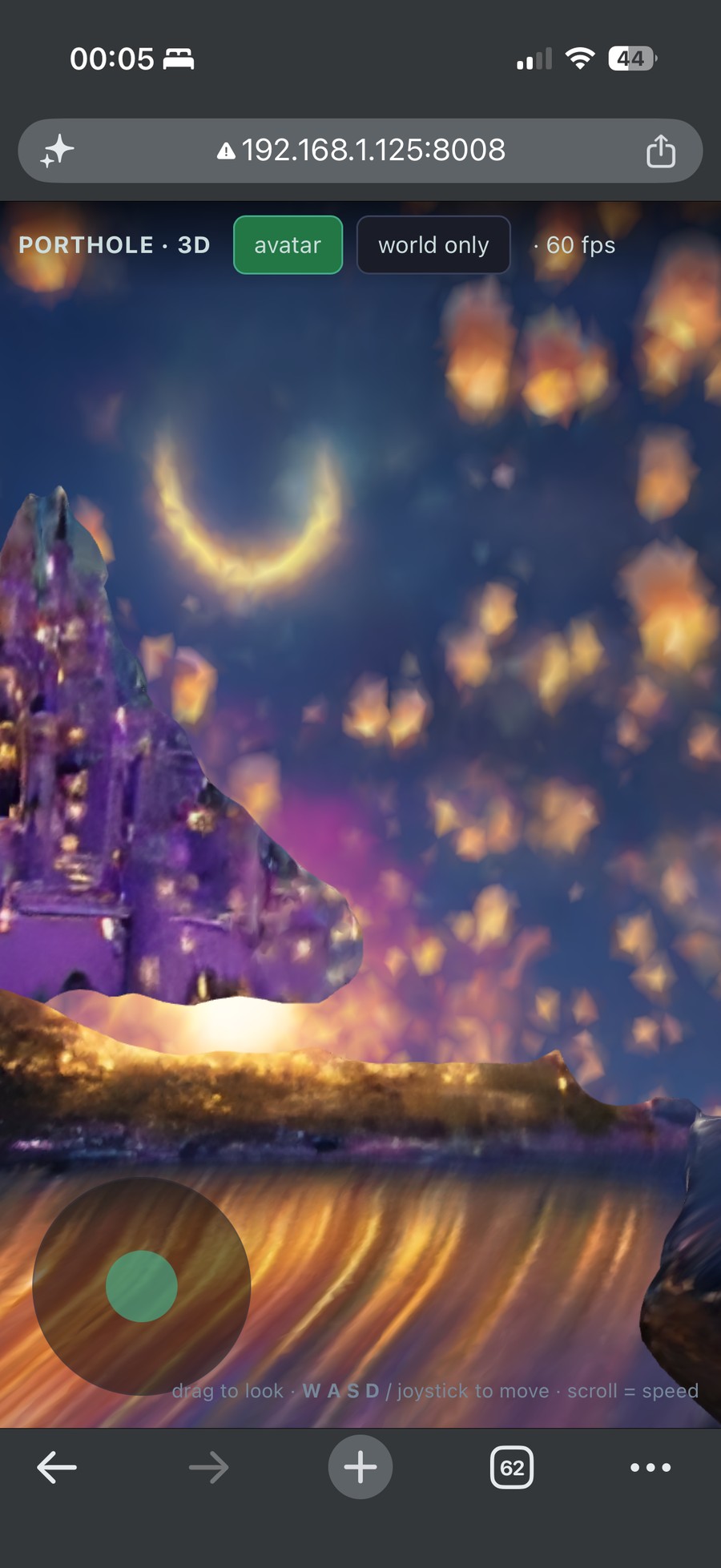
The version that looks cool on Twitter is a live world model, where you move the camera and it generates the next frame so you "walk" around a world it's inventing on the fly. I built the first pass on one (InSpatio-WorldFM, single-step distilled so it runs interactively), and it produces frames, technically, in the same sense that a lava lamp produces images, mine came out looking like an acid trip you'd order off Temu. It's also the wrong tool for what I wanted, and not in a way I could fix.
Start with the drift, because that's the one that kills it. Every frame is built on top of the last one it generated, so errors compound and the whole world melts within a few seconds. Textures smear, geometry bends, colors wander off to die. You can slow that down. You can't stop it, at least not on a GPU I can afford. Then there's the memory, or the lack of one: turn around and turn back and it's a different place, because the view gets re-hallucinated from a tiny cache, so you can't leave a boat somewhere and expect it to still be there when you look again, which was the entire and only thing I wanted. The frame rate doesn't help, maybe 7 fps on a 4090 if the gods are kind and more like 3 once you add compositing and encoding, and you don't tune under that because the model just isn't faster than it is. And even with all of that fixed, the only verb the interface gives you is move the camera. There's no "put a person here." That's a generative thing it doesn't do and never claimed to.
So it's a world that dissolves while you're looking at it, forgets where everything is, and runs at 3 fps, which is a fine art installation and a terrible place for a date, so I baked one that stays put instead. (Live world models are genuinely hard research and I'm not knocking that. The complaint is narrower, it's about using one as the runtime for something that has to still exist five seconds later.)
So I baked one instead
The thing that stays put is a 3D Gaussian splat, which is a couple million tiny colored fuzzy blobs suspended in space that blend into an image when you render them, basically a point cloud that went to art school. It's real geometry instead of a video, so a browser draws it at 60 fps on a phone with nothing running on the backend. I didn't build the pipeline that makes one, that's Tencent's HunyuanWorld 2.0 and I just ran it, which is most of engineering if we're being honest, but the shape of it matters because it's the reason things look the way they do later:
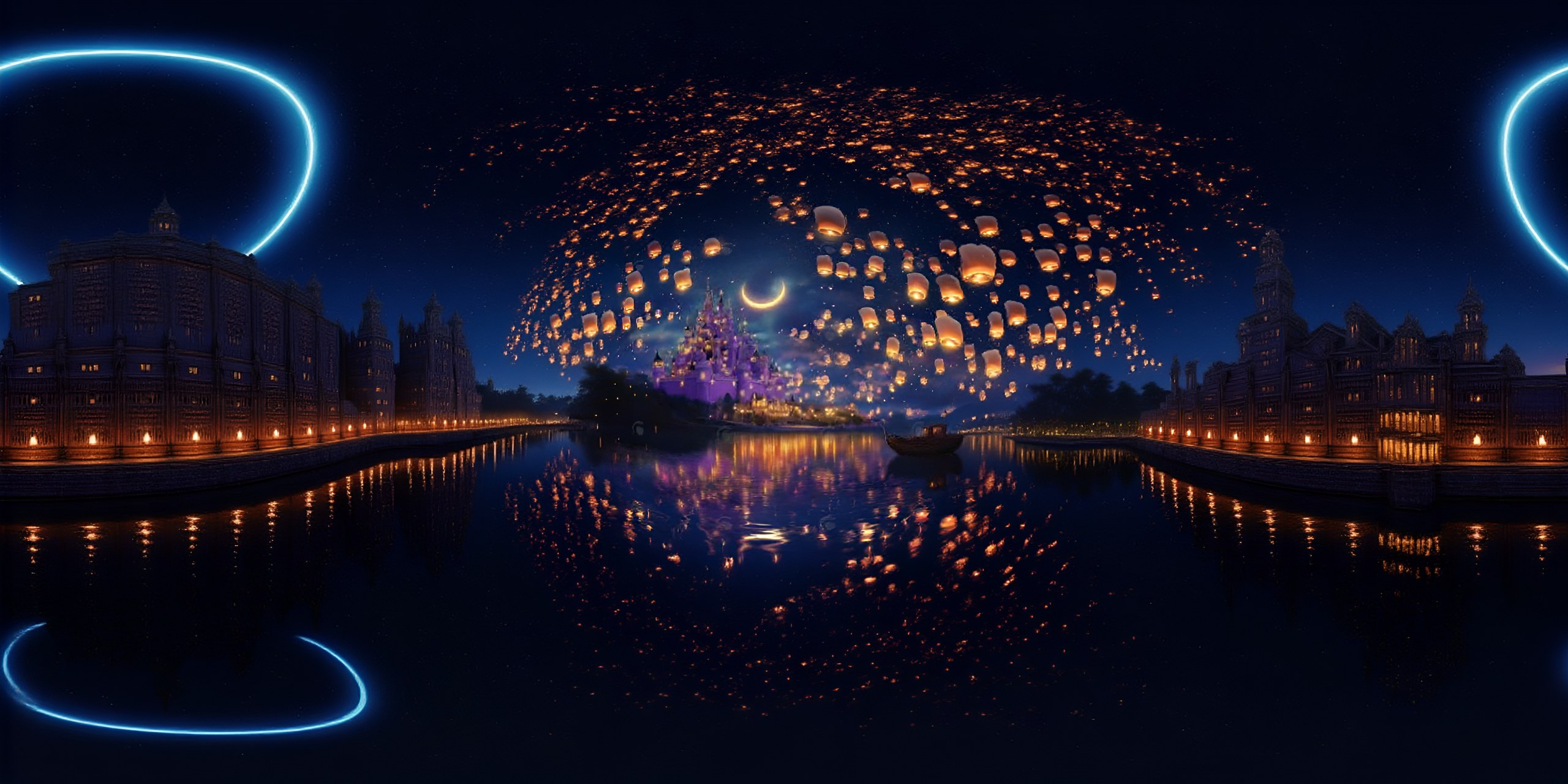
- One panorama in, a single 360° photo of the scene.
- Plan camera paths, where a vision-language model stares at the panorama and guesses where a person would actually walk.
- Render a rough point cloud along those paths to get starter frames.
- Fill in the rest with a video model, so those frames go through WorldStereo-2, which invents plausible new angles for everything a single panorama can't see.
- Reconstruct depth, normals, and sky into the actual Gaussian splat.
So half the world is real because it came from the panorama you fed in, and the other half is the video model making stuff up, and you should hold onto that because it's the whole next section.
Why it came out grainy (and where quality actually lives)
First bake looked like ass. Not broken, you could tell it was a lantern-lit river with a castle, but grainy and soft and cheap in a way where you wouldn't bring a date there unless the date was also a hostage.
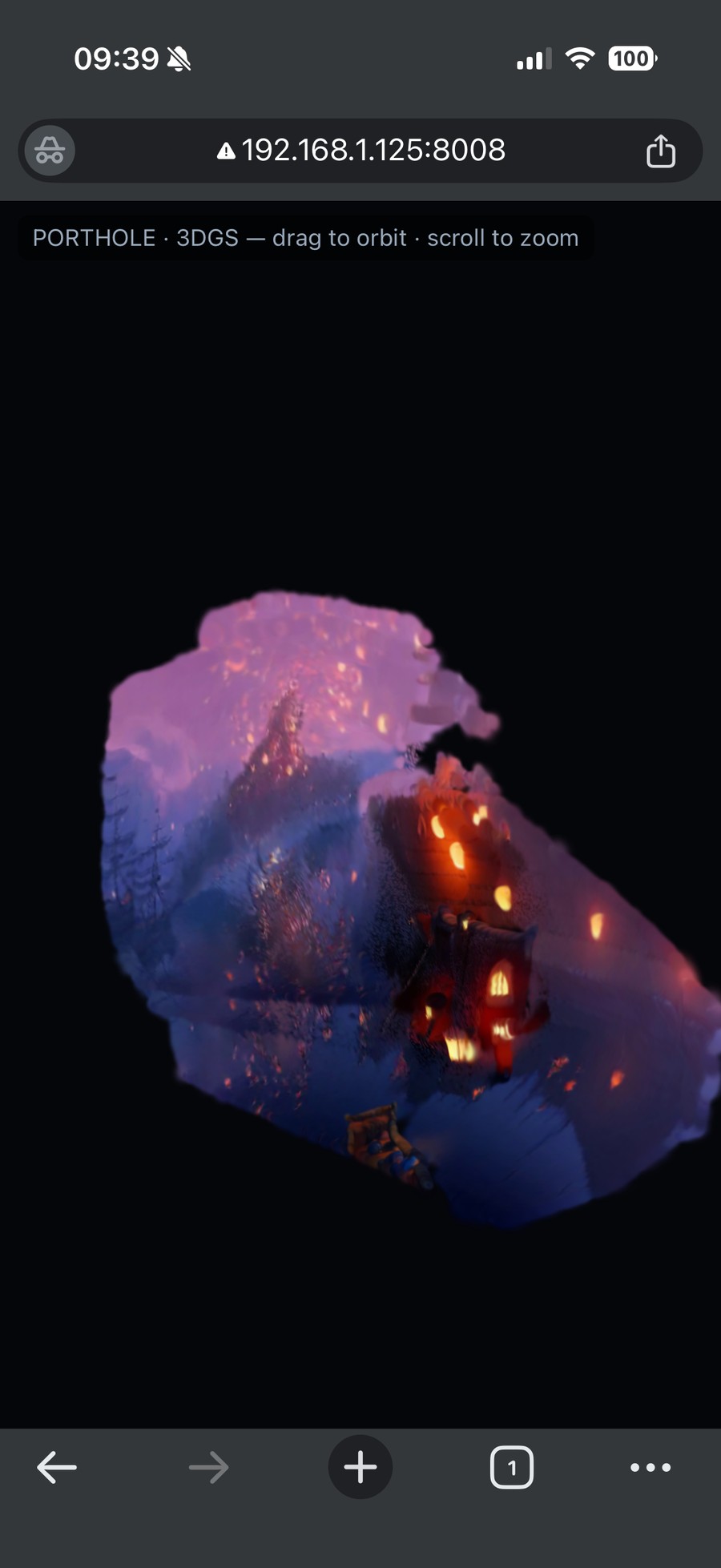
The obvious move is to throw resolution at it, so I did the two lazy things: upscaled the input panorama 2x with Real-ESRGAN and flipped on the pipeline's --high_res flag, which took it from 589k blobs to 1.9M, made the splats smaller and sharper, and made the parts of the world that came from the panorama look meaningfully less bad.
Only those parts, though, and this is the one thing actually worth knowing: the video model sets the quality ceiling, so upscaling the input only helps the half of the world you're looking straight at and does nothing for the half the model is dreaming up. WorldStereo runs at 480p, so everything it invents is 480p no matter how gorgeous your input panorama is, which means the edges of the world, the stuff that only exists because the model made it up, stay soft forever.
I know the two are welded together because I tried to pry them apart and it detonated. I bumped an intermediate resolution from 480 to 720, on the galaxy-brained theory that more pixels early means more pixels everywhere, and got this:
ValueError: all the input array dimensions except for the concatenation axis must
match exactly, but along dimension 1, the array at index 0 has size 480 and index
3 has size 720
It's stitching the rendered views together with the 480p generated frames and they have to be the same size, so no, you don't get to just turn the resolution up. The real fix is to upscale the generated frames too or swap in a bigger video model, both of which cost more, and I was not about to buy 4K for a boat ride.
The stuff that actually wasted my time
Most of what breaks when you run someone's research code on rented GPUs is boring (wrong wheel versions, a dead import three dependencies deep, keeping a job alive when your SSH quietly dies), so I'll spare you the diary. One thing wasn't boring, because every multi-GPU step died instantly with this:
transport/nvls.cc:254 NCCL WARN Cuda failure 401 'the operation cannot be
performed in the present state'
NVLS is NVLink SHARP, a fast path NCCL uses for multi-GPU communication over NVLink, on by default on H100s, and the catch is it needs a privileged GPU feature the container has to actually be allowed to touch, which a rented container usually isn't, so NCCL reaches for the fast path, gets slapped down, and dies before doing a single useful thing. The genuinely infuriating part is that the obvious fix is wrong: NCCL_P2P_DISABLE=1 looks correct and accomplishes nothing, because regular NVLink is fine and it's specifically the multicast path that's blocked, and what you actually want is NCCL_NVLS_ENABLE=0. Which is documented, if you already know the word "NVLS," which you don't, because the error just points at a file and shrugs.
I should also be honest about the cost, because the clean number I want to quote is a lie. The working bake took about 13 minutes on four H100s, so call it three bucks, but the whole thing (two full bakes, 125 GB of downloaded model weights, and a generous pile of my own failed runs) came to closer to $90, which is the actual lesson: compute is basically free and what bankrupts you is downloading models and being wrong repeatedly. The single biggest time-sink had nothing to do with the GPU. Hugging Face throttled my downloads to 10 MB/s until I authenticated and set HF_XET_HIGH_PERFORMANCE, which took it to 150-450, and that ate more wall-clock than every actual computation combined.
Getting us in the boat
Okay, the actual point of all this. Putting a person in the world is almost boring, which is precisely why I baked it this way, because the world is just geometry sitting there so a character loads in as an ordinary 3D model, depth-tested against the splats and dropped wherever I want, load the .glb, put it in the boat, done, no compositing every frame, no relighting, no praying it doesn't flicker out of existence. I picked the boring approach specifically so the part I cared about would be trivial, and it was.
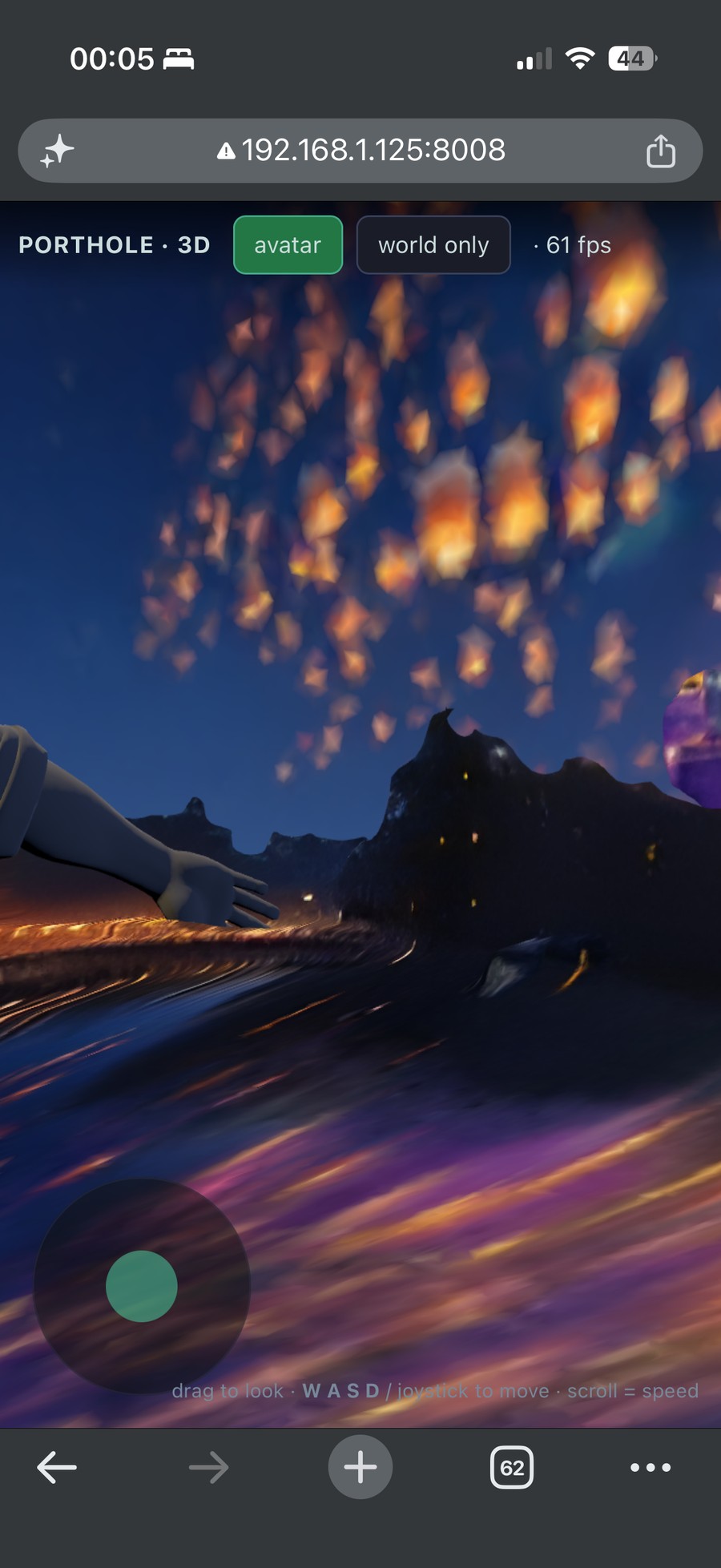
Honest status: one of us is in the boat so far, and it's a fan-made model because I'm not touching actual studio files, and the second one's next. The movie characters are a placeholder. The endgame of the bigger project is scanning real people and dropping them into a world that holds still long enough to matter, which is either the future of memory or an extremely elaborate way to avoid touching grass, and the jury's still out. The lantern scene is just the one I cared enough about to be debugging NCCL at midnight for.
Last delivery problem: 1.9M blobs is about 61 MB, and the phone has to depth-sort every one of them every single frame, which over the network just hangs until it times out, so I fixed it with one cull, drop everything under 0.1 opacity and keep the top 800k by opacity and size, which halves the file and the sort. The stupidly convenient part is that the blobs I threw out were mostly faint floaters, and faint floaters were a big chunk of what looked grainy to begin with, so one threshold bought a smaller download, faster rendering, and a cleaner image simultaneously. The lighter world literally looks better, which almost never happens, so I'm choosing to enjoy it.
Did I get what I wanted?
Mostly. There's a lantern-lit river you can walk around in a browser tab, there's a boat, one of us is in it, it's soft around the edges where the model was improvising but it's unmistakably the place, and I can text someone a link and drop them into the scene from our movie.
None of the parts are mine (the pipeline's Tencent's, splats are old news, and the NVLS fix is documented for anyone who knows to go looking), but what I walked away with is two things worth knowing: in these panorama-to-video-to-splat setups the video model caps how much quality you can buy from the input side, and the same cull that makes it load faster also makes it look better. Everything else was tax.
Worth it? No. Obviously I'd do it again.
References
- B. Kerbl, G. Kopanas, T. Leimkühler, G. Drettakis. 3D Gaussian Splatting for Real-Time Radiance Field Rendering. ACM Transactions on Graphics (SIGGRAPH), 2023. arXiv:2308.04079
- Tencent Hunyuan. HunyuanWorld 2.0, the open panorama-to-3D world generation pipeline. github.com/Tencent-Hunyuan/HY-World-2.0
- Wan Team, Alibaba. Wan2.1: Open Large-Scale Video Generative Models, the I2V-14B-480P backbone behind WorldStereo. huggingface.co/Wan-AI/Wan2.1-I2V-14B-480P-Diffusers
- X. Wang, L. Xie, C. Dong, Y. Shan. Real-ESRGAN: Training Real-World Blind Super-Resolution with Pure Synthetic Data. ICCV Workshops, 2021. arXiv:2107.10833
- M. Kellogg. GaussianSplats3D, the WebGL 3D Gaussian splat renderer. github.com/mkkellogg/GaussianSplats3D
- NVIDIA. NCCL Environment Variables (
NCCL_NVLS_ENABLEand NVLink SHARP). docs.nvidia.com/deeplearning/nccl